
How to Repurpose a Blog Post Into a Carousel (3 Steps)
It takes around 12 hours of time to craft a single blog post in our study: 4 hours for research, outlining, writing, and optimization.Then 8 more for editing and finalizing. It’s absurd to put so much effort into an article, only to then post once and move on to writing another one, leaving tons of potential content on the table.
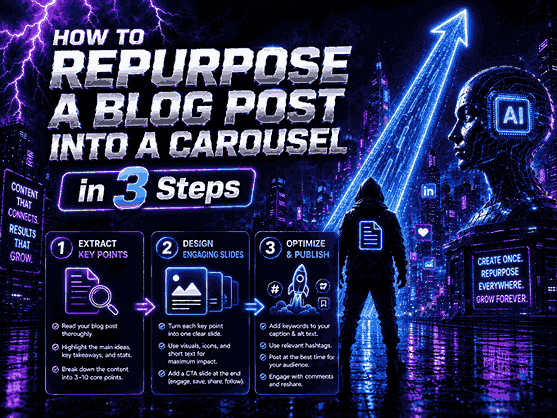
A single blog post can become countless content assets when you put it to work. And few repurposing methods work better for capturing the attention of the masses, other than by turning a blog into a visual social media carousel (or two or three) for Instagram, Facebook, LinkedIn, Pinterest and more.
Not only can you access new audiences who are not typically drawn to long-form articles by repurposing blog posts to social posts, but you can boost engagement, lengthen your content’s life cycle, drive additional traffic to your website and a host of other benefits. And best of all, you won’t need to possess a single graphic design skill. Using the most up to date AI blog to social post carousels can help you create a stunning, fully-professional carousel for any social network, and all in mere minutes.
Continue reading to get step-by-step instructions for how to turn a blog post into a social media carousel for 3 of the most popular social media channels by following the three-step framework that is being utilized by agencies, bloggers, and businesses across industries to make the most out of the content they publish.
Why Carousels Are One of the Best Content Repurposing Formats
Various formats create various results. The carousel post generally works better than a single-image post since it encourages users to spend more time interacting with your content, signaling the algorithm through each swipe that you have created engaging content.
Turn your blog post into a carousel to:
- Reach users that aren’t reading your blog,
- Get more saves and shares,
- Increase engagement,
- Build brand authority,
- Bring qualified traffic to your site,
- Create several social media posts out of one article,
- Maximize your existing content’s ROI.
This has to be one of the most high-leverage content repurposing strategies around today.
Before You Start: Pick the Right Blog Post for Carouselization
One common mistake that creators commit is to try to turn every post into a carousel.
The best performing carousels typically derive from blog posts that have:
Blog Type | Carousel Potential |
Step-by-step guides | Excellent |
Tutorials | Excellent |
Checklists | Excellent |
Case studies | High |
Industry statistics | High |
Opinion pieces | Medium |
News updates | Medium |
Product announcements | Low |
However, should you be intent on repurposing content, the best place to start is with your most successful pieces.
Successful content tends to be successful across multiple platforms.
Step 1: Extract A Single Core Message From the Blog
The absolute greatest sin when you turn a repurpose blog post into a carousel is trying to force a blog post into slides.
Your carousel is not a blog post.
The important thing here is to identify one piece of knowledge that you can learn from the blog post.
Take, for example, a topic like the one below:
Blog Topic:
10 SEO Tips for Small Businesses
Carousel Topic:
- 5 SEO Mistakes Small Businesses Make
- See what’s happened here?
- By narrowing your scope the carousel is more digestible and more shareable.
AI Prompt Example
Give our favorite prompt here:
“Please break down this blog post and highlight the 7 greatest learnings from this article and turn them into a social media carousel. “
That should give you back several hours of your life.
Step 2: Create a Swipe-Worthy Carousel Structure
Your carousel goes from good to great because of its structure.
It’s not designed; people swipe for novelty and curiosity about what’s coming next.
Here is my template:
Slide 1: The Hook – the scroll-stopping first slide
Here are a few examples:
- The Content Repurposing Strategy Every Brand is Missing Out On
- Transform Your Blog Post Into 10 Engaging Social Updates
- The Method We Used to Increase Engagement By 50% By Repurposing Old Content
The Three-Step Blueprint to Developing Highly Engaging Carousels
Slide 2 to Slide 7: Create Value
Each slide should include:
- A single concept
- A title
- An additional explanation
- Bullets, not blocks.
- Clarity, not confusion.
Slide 8: Quick Recap
Summarize the key lessons.
People often save content that provides a clear summary.
Final Slide: CTA
Examples:
- Save carousel for later
- Follow us for more tips on content marketing
- Read full blog post
- Share this with your team
Strong CTA increases engagement significantly.
Step 3: Build Professional Carousels Using AI
Whereas designing used to be the most challenging part of creating carousels, AI makes it easy nowadays.
Contemporary AI-powered content repurposing software can perform such functions as:
- Layout generation for slides
- Content rewriting suitable for social media posts
- Creating visuals
- Headline suggestion
- Maintaining brand consistency
- Improving readability
Thus, designers can concentrate on their strategies.
Top 5 Design Tips for Successful Creators
1. One Message per Slide
- Do not overcrowd slides.
- Minimal slides are engaging slides.
2. Use Large Titles
- Your content must be readable within seconds.
3. Design a Visual Hierarchy
Focus attention with the help of:
- Titles
- Subtitles
- Icons
- Space
4. Maintain Uniformity
Apply:
- Similar fonts
- Color schemes
- Similar layout design
- Uniformity creates trust.
5. Start from the Mobile Version
- More than 90% of social media users access their profiles via mobile.
- Always check your slides on a mobile device before posting.
Workflow for Repurposing Content Adopted by Top Performers
It’s not common for top performers to make new content daily.
Top performers have developed a workflow of repurposing content which includes:
- Creating a blog post
- Highlighting insights gained from the blog post
- Creating a carousel
- Creating a post for LinkedIn
- Creating a Twitter thread
- Converting insights into short videos
- Adding content to an email newsletter
Repurposing one piece of content into many different pieces allows you to market for weeks at a time.
Conclusion
With the aim of getting maximum value out of every blog article, adding a repurpose blog post carousel into your list of strategies is essential.
You can easily convert all your blog articles into appealing visual content that attracts more audiences from various channels.
It’s important that you do this in the following ways:
- Take the key lessons out of each blog post.
- Arrange these in swipeable slides.
- Make use of AI technology to make professional visuals.
No matter whether you are a blogger, marketer, creator, or entrepreneur, knowing how to repurpose your blog post content into social media post content may help get the most out of it.
Content creators don’t produce more content; they make the most of the content they already have.
FAQs
What is a blog carousel?
A blog carousel is a set of visual slides made from blog posts, which can be posted to various social media platforms, like Instagram or LinkedIn.
Why should I convert my blog post into a carousel?
Using carousels will help you to increase engagement, enhance reach, get new audiences on social media, and leverage the power of your content.
How many slides should be in my carousel?
In most cases, the number of slides is around 5 to 10, depending on the complexity of the topic.
Is it possible to let an AI create a carousel automatically?
Indeed, most modern tools for content conversion can generate the slides automatically.
Which types of blog posts can I use to create a carousel?
Tutorial articles, guides, listicles, case studies, framework descriptions, and other types of educational content usually work the best in carousel formats.
